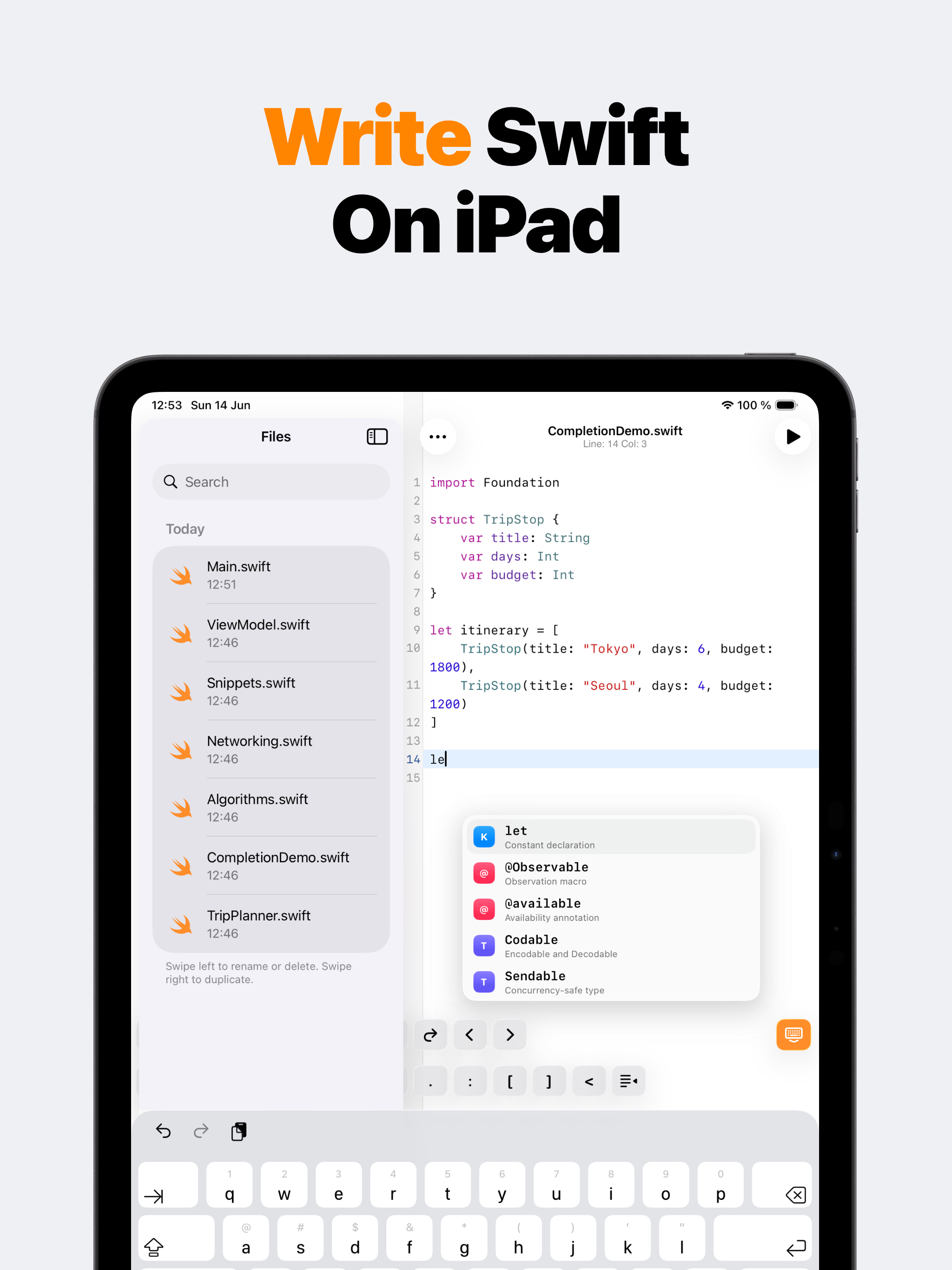
SwiftMate file sidebar and Swift editor on iPad

SwiftMate on iPad

Swift IDE for iPad

SwiftMate uses the iPad's wider screen for a practical file-and-editor workflow. Keep Swift files visible beside the code, type with completion suggestions and keyboard tools, run snippets through the hosted compiler, and open console output without leaving the project you are practicing.

iPhone + iPad Swift editor Console + diagnostics

Files and code side by side

On iPad, SwiftMate can keep the file list and editor available in the same workspace. That makes it easier to move between an algorithm, a model example, a networking experiment, and reusable snippets without repeatedly opening and closing navigation screens.

The editor keeps the same syntax highlighting, search, automatic indentation, smart pairs, local completions, and configurable appearance as the iPhone version, with more room for longer lines and an external keyboard workflow.

  • iPad file sidebar
  • Large Swift editor
  • Completion suggestions
  • Keyboard accessory controls
  • Console over the current file
  • Import, export, duplicate, and share

Keep the compiler result beside the editor

After a run, SwiftMate presents console output over the code so the relationship between the snippet and its result stays clear. Compiler diagnostics help locate mistakes, while Premium AST inspection can expose parsed structure when output alone is not enough.

Execution still happens through the configured HTTPS backend. The iPad app is the editor and results client; it does not embed a complete local Xcode toolchain or iOS Simulator.

SwiftMate or Swift Playgrounds on iPad?

Choose SwiftMate for a compact snippet runner, file organizer, image-to-code workflow, and quick console feedback. Choose Apple's Swift Playgrounds when you want Apple-designed lessons, live SwiftUI app development, access to iPad frameworks, Swift packages, or App Store submission from iPad.

Both can support Swift learning, but they solve different jobs. SwiftMate stays focused on short code experiments rather than complete app projects.

Read the full, feature-by-feature comparison before choosing a workflow. Compare SwiftMate and Swift Playgrounds

SwiftMate FAQ

What is SwiftMate?

SwiftMate is a Swift code editor and hosted runner for iPhone and iPad. Use it to write short Swift programs, organize files, run snippets, read console output and compiler diagnostics, and inspect code structure without opening a Mac for every small experiment. Learn more about SwiftMate.

Can SwiftMate run Swift code on iPhone?

Yes. Write or import a Swift snippet, tap Run, and SwiftMate sends the code over HTTPS to its configured Swift runner. The result returns to the in-app console with output, exit status, duration, and diagnostics when available. Learn more about running Swift code.

Does my Swift code stay on the device?

Files stay local while you edit and organize them. When you choose Run or AST, the source and optional input must be sent to the runner backend for compilation or inspection. Source code and console contents are excluded from product analytics and crash-report parameters. Learn more in the SwiftMate FAQ.

Does SwiftMate replace Xcode?

No. SwiftMate is built for snippets, exercises, algorithms, and fast experiments. It does not build or sign complete iOS apps, run an iOS Simulator, show live SwiftUI previews, archive projects, or submit apps to App Store Connect. Compare SwiftMate and Swift Playgrounds.

Can I use SwiftMate on iPad?

Yes. SwiftMate supports iPad with a wider editor layout, file navigation, completion suggestions, console output, and the same core snippet workflow available on iPhone. Learn more about SwiftMate on iPad.

What does SwiftMate Premium add?

Premium can unlock broader run access, image-to-code import, custom snippets, pro editor fonts, additional Swift versions, and AST inspection. Exact products, prices, quotas, and availability can vary, so check the current App Store offer before purchasing. Learn more in the SwiftMate FAQ.